With the click of a checkbox, you can randomize the questions on any page of a survey or quiz. This feature is particularly useful for scientific research, and helping students to review course content and prepare for exams. Here’s how it works.
First, you’ll want to create a survey, or create a quiz.
Once you’ve got your questions set up, you can click on the Reordering section, then check the checkbox next to Randomize questions:
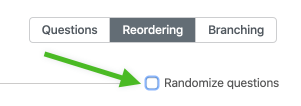
If your survey/quiz has multiple pages, be sure to click on the Randomize questions checkbox at the top of each page of your survey or quiz.
Now, when participants attempt your quiz or take your survey, they’ll see the questions appear in a random order.
Note that question randomization cannot be used with question branching/forking. Question branching sets a deliberate path through the survey based on criteria that you choose. Randomization shows the questions in a random order.
 Crowdsignal